

01
Pick one look people can name in a second
Jean Phil is recognizable in a single frame: a blond bowl-cut bob, a vintage patterned suit and a deadpan face. Nothing about that look changes between his reels, so a viewer who has scrolled past three of them could describe him from memory. Build your Character the same way: one hair shape, one outfit, one expression, and no more than three details a stranger could name.
In Character App, open New Character, type a name and describe only what a portrait can show: age range, hair, outfit and expression. Pick a Look, draw the Image and keep the result you would still recognize at thumbnail size. That saved Character is the reference every later Clip starts from. The design formula and the Character-from-words guide go deeper.

The artwork is our concept example. Your edited brief opens the real Character form; no drawing starts here.
02
Choose one bit you can repeat for a year
A bit is a verb the audience can predict: shadowboxing in a park, a paired dance outside an office, a sparring match in a courtyard. In the sampled public reels, Jean’s look and straight face stay put while the action and the company change. The repeat lets a stranger recognize the next post before reading the caption, and recognition is what makes someone send it to a friend.
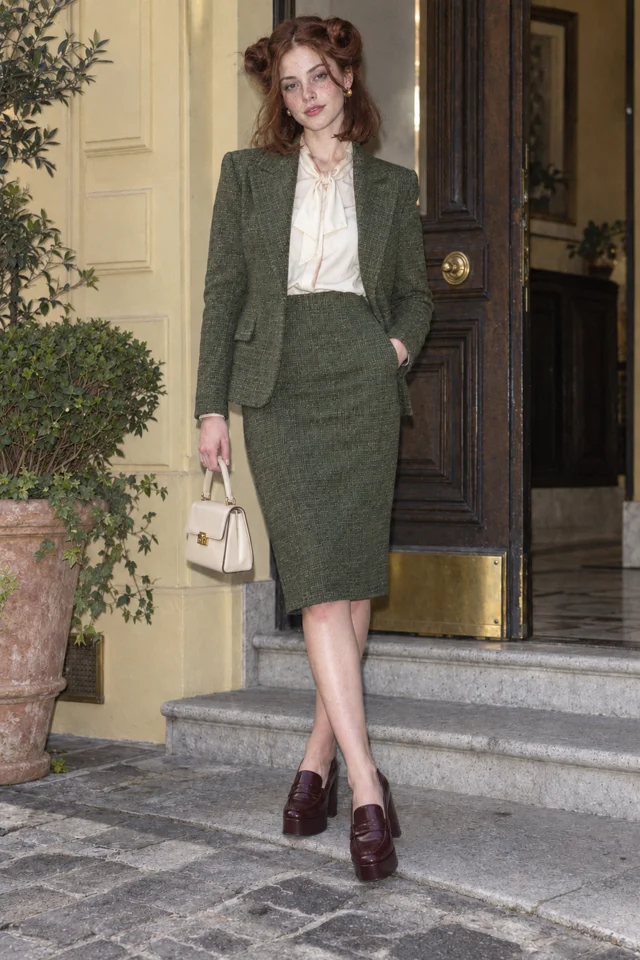
Write your bit as one filmable physical event: a named subject, a plain verb and a visible object. For the worked example, Lucie Loop, an original adult Character in an oxblood suit: “Lucie steps through a revolving door like a runway, pauses and gives the door a solemn nod.” Her face never breaks. Test the idea by asking whether you could film it ten more times somewhere else.
Every entrance is a runway.
Live action selected for this walkthrough. Choose your Look in the app; this inspector keeps the original reference artwork.
03
Make the first Clip and check the face
Open the Playground, pick your saved Character and describe the bit in one sentence under Create. Character App films the Clip on H3 Turbo from that reference, and a 5-second Clip is 15 Credits (3 Credits a second), shown on the button before you press. Clips need a plan: Starter is $19.99 a month with 800 Credits, and the free Studio covers Characters and Images.
Hold the result up to your saved Image: same hair shape, same outfit, same expression? If a detail drifts, press New take, which costs Credits again, or tighten the description before you spend more. Keep only a take you would be proud to post. The goal is a Clip that matches the Character; the next steps repeat it. The recurring Clips guide plans a run of three.
Every entrance is a runway.
Live action selected for this walkthrough. Choose your Look in the app; this inspector keeps the original reference artwork.
04
Put your Character on a real street
Jean’s reels happen on actual streets, in parks, outside office fronts and in a tower courtyard. The real place is what makes the absurd person funny: a plain pavement tells the viewer the joke is the Character, not the set. Pick locations you can name in three words, such as a crosswalk, a bus stop or a bakery queue, and give every post one place.
The most direct route is Star in a clip. Film yourself or a friend doing the bit on a real street, tall 9:16, one person, 5 to 30 seconds, then open Star in a clip in the Playground. Pick the clip, pick who stars and tick “I have the rights to this clip and the person in it agreed to AI processing.” Your Character replaces the performer and keeps the moves and the street. A 5-second take is 15 Credits.
CLIP DIRECTION PREVIEW
Give Lucie one clear action.
Keep this direction for Playground. This artwork is a Character reference, not a Clip generated from your text.
Open Playground ↗05
Add a duo, then a crossover
Jean often performs with someone: a paired dance with Clarabelle, a hand routine outside an office front, a park sparring duo with Arthur. A partner gives the deadpan face something to react to, and because those reels also sit on Clarabelle’s and Arthur’s accounts, each one reaches a second audience. Give your lead a partner with the opposite trait: serious beside delighted. The rivals guide designs the pair.
In Character App, make the partner as a second Character. Star in a clip takes one Character per clip, so make each half of a duo as its own Clip and cut them together, or put both in a World’s Cast and Film the meeting as a Scene. A crossover with another creator’s character is a collaboration: do it by agreement, with Characters you made or have permission to use.
SCENE 1An entrance
Lucie Loop makes a perfectly serious entrance.
 SCENE 2
A complication
Ines Brume has already claimed the good chair.
 SCENE 3
A next episode
Sofia Velluto turns a small errand into a new episode.
Original artwork and illustrative Scene cards · not generated Film frames.
Start my World ↗06
Set a cadence you can keep
Repetition needs frequency. In the sampled public posts, Jean appears on 18 and 19 September, back to back, in a new location each time. Pick a rhythm you can hold for eight weeks, such as three Clips a week, and fix the slot before you make anything. A viewer who sees the bit twice in a week starts to expect it, and expectation is what a series is made of.
Batch it. One evening can cover a week: write five bits, make five Clips and keep the best three or four. Five 5-second Clips are 75 Credits before any New take, so a Starter month of 800 Credits goes further than it sounds. Export each Clip from your Library and post it where you like. Reach depends on many things; a cadence only makes sure you keep showing up.
07
Label it before you post it
Label your AI character as AI. TikTok, Instagram and YouTube each have AI-content labels or settings, YouTube’s being “AI use” for realistic content, and a bio line such as “an AI character” tells new viewers up front. Paid deals need a clear disclosure under the FTC’s Endorsement Guides, and an AI character cannot say it tried a product it never used; the FTC’s fake-review rule covers made-up testimonials.
In the EU, Article 50 of the AI Act, applying from 2 August 2026, requires publishers of realistic AI image, audio or video that could pass as authentic to disclose it as artificially generated, with a lighter, non-intrusive notice for clearly creative or satirical work. A deadpan Character on a real street can look authentic, so label it. Use your own face or an original Character, never a public figure.
The artwork is our concept example. Your edited brief opens the real Character form; no drawing starts here.
08
Read what repeats, then keep the formula
After a week or two, compare your posts. Which bit was watched to the end, which location was saved, which partner drew comments? Keep what repeats and drop the rest. Change one thing at a time: a new street with the same look and bit, or a new partner on the same street. When everything changes at once you cannot tell what worked.
Protect the identity while you experiment. Keep the saved Character reference, the same Look and the same opening gesture, and treat each new Clip as a test against it. Once the Character has an audience, build a World so the next ten Clips have places and people to start from. The Jean Phil playbook shows the whole pattern, and AI influencer covers a face that stays the same across a feed.
Every entrance is a runway.
Live action selected for this walkthrough. Choose your Look in the app; this inspector keeps the original reference artwork.
Keep it sharp.
- Changing the look, the bit and the place in the same post, so a viewer never learns what to recognize.
- Copying Jean Phil’s face and suit as a bundle instead of taking the structure and giving your Character its own identity.
- Posting realistic AI Clips with no label, or letting an AI character vouch for a product it never used.
- Putting a real person or a clip you do not have the rights to into Star in a clip.
Things you’re wondering.
What makes an AI character go viral?
No one can promise it, but the pattern in Jean Phil’s reels is a look people recognize in one frame, a bit that repeats, a real setting and a steady posting rhythm. Those are the parts you control. Reach depends on the platform, the timing and luck.
How much does it cost to make a viral AI character?
Characters and Images start in the free Studio. Clips need a plan: Starter is $19.99 a month with 800 Credits, and a 5-second H3 Turbo Clip is 15 Credits (3 Credits a second), shown on the button before you press.
Do I have to label my AI character as AI?
Often, yes. TikTok, Instagram and YouTube have AI disclosure settings, the FTC expects clear disclosure of paid deals, and the EU AI Act’s Article 50 requires realistic AI media that could pass as authentic to be disclosed from 2 August 2026. Check each platform’s current rules; Character App explains them but does not certify compliance.
Can I put myself or a friend into a viral Clip?
Yes, with Star in a clip: upload a tall 9:16 clip with one person and the rights to use it, and pick a Character to star. Use your own likeness, or a friend’s only with their agreement. Public figures and real people who have not agreed are off limits.
Can I make Jean Phil himself?
Make a Jean-Phil-style Character instead: your own face, name and bit, built on the same structure of one look, one repeatable action and a real place. The how-to-make-Jean-Phil guide walks through an original brief.
Do I need a World to start?
No. Start with one Character and a few Clips from the Playground. Add a World when you want a recurring Cast, places and a Story to grow together.
Checked sources.
- Jean Phil public Instagram profile ↗
- Jean Phil: park shadowboxing post, 19 September 2026 ↗
- Jean Phil: street shadowboxing post, 18 September 2026 ↗
- Jean + Clarabelle paired dance — reel from @clarabelle.paris ↗
- Jean + Clarabelle hand dance by an office frontage — reel from @clarabelle.paris ↗
- Jean tower-courtyard shadowboxing — reel from @clarabelle.paris ↗
- Jean in a park sparring duo — reel from @arthur_teddington ↗
- FTC: Endorsement Guides, what people are asking ↗
- EU AI Act, Article 50: transparency obligations ↗
- YouTube Help: disclosing altered or synthetic content ↗
Explore the app.
- PLAYBOOK · The Jean Phil playbook ↗
- FEATURE · Make an AI influencer ↗
- GUIDE · Make Characters and Clips from your AI agent ↗
- APP · Open New Character ↗
- APP · Open the Playground ↗