Start with the words at the counter
Ask the person serving customers to finish this sentence: “On Friday, bring ___ to ___ and we will ___.” If staff need to ask which size, product or location qualifies, put that answer in the script. Replace the exercise’s invented deal before filming.
Open the editable Black Friday shot list. Give the offer, the end time and the action their own fields so a late change to the hours is easy to find.
Try thisGive the first three seconds a job
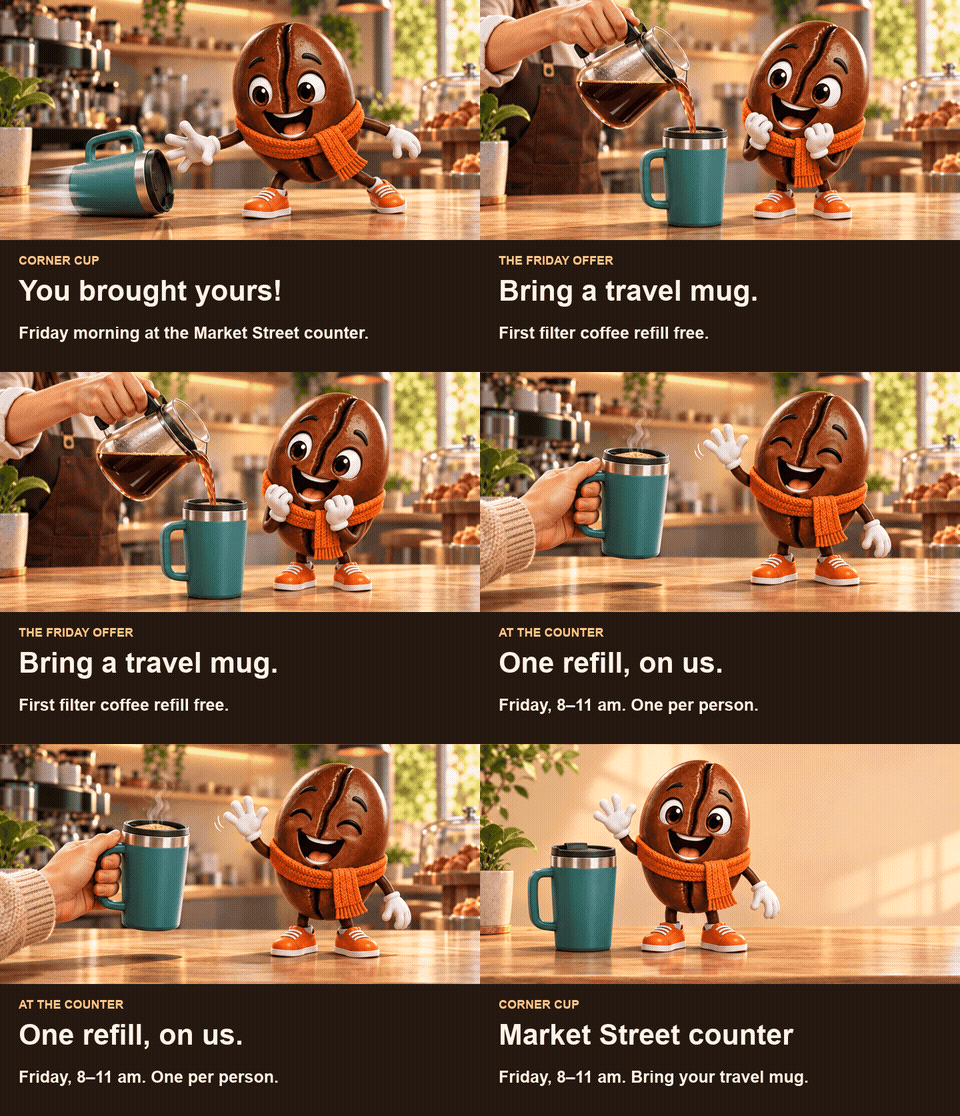
Start on the empty mug. A viewer who joins halfway through the first shot should still see what changes when the barista pours. For a different product, choose a visible before and after: an unopened box beside its assembled lamp, or a bare collar beside the finished bandana.
The coffee-bean mascot’s wave is an existing Character App example. Watch the white glove against the dark coffee bean. In this storyboard, saving that wave for the handoff keeps the first shot about the mug.
Write the sound-off version
Play the cut muted. Can someone tell you what to bring, what they receive and when to visit? If they say “I think all the coffee is free,” change “Friday coffee on us” to “Bring a travel mug. First filter coffee refill free.” Add the final offer as editable text in your video editor.
Cut a six-second reminder
Use the pour from seconds zero to three with the line “Travel mug? First filter coffee refill free.” Hold the card for the last three seconds: “Corner Cup · Market Street · Friday 8–11 am · One per person.” Play it at phone size. If the conditions need another line, keep the fifteen-second version.
Swap the offer without reshooting the mascot
Suppose a ceramics shop offers gift wrapping during pickup instead. Replace the pour with hands folding paper around a boxed mug. Use “Free gift wrap with pickup” over the fold and put the shop, pickup hours and booking instruction on the card. A viewer can now see exactly what the offer adds.
If you want a recurring face for your own shop, start with the mascot maker. Keep the offer on the end card so the same character can return after Friday.
Common mistakes
Opening with a sale graphic and waiting until the final frame to show the product.
Using a percentage in the voiceover after the offer has changed to a gift or a bundle.
Sending viewers to a homepage when the offer can only be claimed at a particular counter.
Questions
What goes into a Black Friday video ad?
Show the product in use, explain the offer in one sentence, then give the viewer a place and time to act. In the café script the empty mug establishes the product, the pour shows what the customer gets and the end card gives the pickup details.
What if my shop is offering a bundle instead of a discount?
Show the items going into the same box. Name each included item and place the actual bundle price beside the box. Give the ordering or pickup instruction on the final card.
Can I use the template without a mascot?
Yes. Film the hands of the person filling the mug or wrapping the order. Their handoff can replace the wave and take the viewer straight to the final card.
How can I adapt the script for Cyber Monday?
For an online offer, replace the store handoff with the ordering step. Show the actual qualifying item and code if there is one. Read the expiry time and time zone from the same page the customer will use.