Write what the listener needs to know
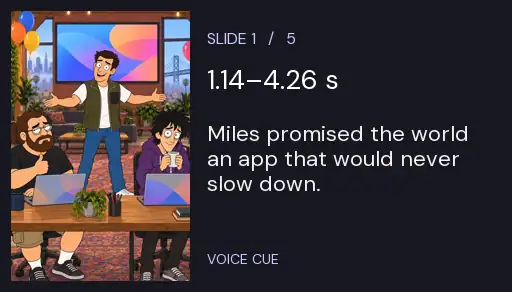
Cover the script and look at the first picture. Miles has both hands open. You can already see him presenting. His promise that the app will never slow down is information a still cannot give you, and it sets up the red padlock two slides later. Write that promise in the voice column.
Try the same test on a photo of your own. A line like “I am standing at the ticket window” repeats the picture. “This is the last ferry that accepts a bicycle” gives the listener a reason to look at the clock.
Try thisFree: your idea as a World with its first Story in pictures. A plan films every Scene.
Measure the pause inside the sentence
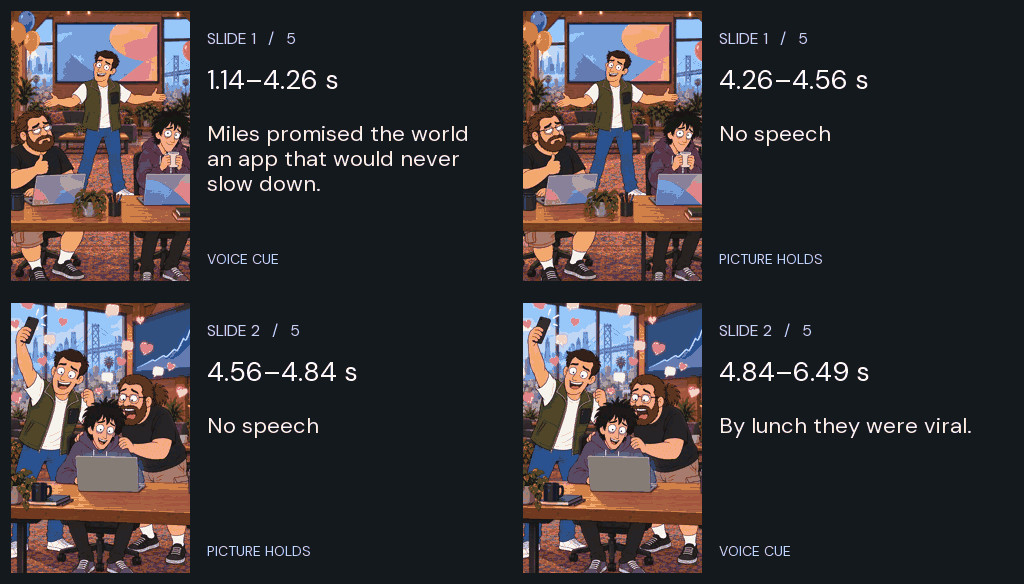
Play slide one. In the original take, “Launch day” begins at 0.21 seconds and ends at 0.71. “Miles” starts at 1.14. That short silence lets the listener take in the room before hearing the promise. Keep it when cutting the line.
Read your version into a phone, then write down when the first and last words sound. For the house line the last word ends at 4.26 seconds. The picture holds until 4.56. Those two numbers give you separate decisions about the voice and the image.
Put the next voice on the same clock
Slide two starts at 4.56 seconds on this worksheet. Its “By lunch” starts 0.28 seconds into its own recording. Add those times: the first word on slide two lands at 4.84 on the combined timeline. The phrase “By lunch they were viral” finishes at 6.49.
Watch the silent timing example and listen to the two takes separately. The viewer sees the new room before the first word arrives. If your new picture introduces someone the listener has never seen, try the same short lead and decide whether their face has time to register.
Cut a phrase before speeding up a read
The middle slide has ten words. The full stop after “red” gives the lock time to appear. The two short bursts that follow let the setback land. The five takes are different lengths because their jokes and pauses need different amounts of time.
If a take overruns your target, underline the information the picture already carries. Remove one of those phrases, record it again and note the new ending. Listen once without the picture to check that the remaining words still make sense.
Time an original Slideshow
Copy the blank timed voiceover worksheet into your notes. Write one picture and one narration line per row. Time an actual read of each line, then add up the durations. Keep the opening and ending times even if you move a slide later.
The Slideshow maker shows how Character App turns a premise or photos into narrated slides. For narrator and music choices, follow the Studio sound guide. To subtitle a finished file, use the separate caption timing exercise.
Common mistakes
Budgeting exactly the same number of seconds for every slide before hearing the lines.
Starting the next picture the instant the previous word ends even when its visual joke needs a beat.
Adding the second recording’s local timestamp to zero instead of the start of its slide.
Questions
How many words fit in a 30-second voiceover?
Measure the speaker and the pauses in your own read. Here, Algieba reads 59 words across five pictures in a 29.36-second sequence. A different narrator can take a different amount of time to read the same words.
What fields should a voiceover script include?
Use a picture cue, the exact spoken words, the take name, the first and last audible timestamps, and the planned picture change. Together they tell the reader what to say and the editor when to move on.
Is the timing GIF supposed to have sound?
The GIF is a silent visual excerpt of the first transition. Use the narration player beneath it to hear any of the five original takes. The table also gives every spoken word as text.
Can I use the worksheet with my own recording?
Yes. Copy the blank section once per picture and replace the example with your own words. The times on this page belong to the house recording.