Make a caricature of yourself, or someone invented, that moves in a Story
Start from your own photo or a line of words, push one feature, add the prop that says what you do, then film the caricature in its first Story.
Your own face, someone who said yes, or an invented person. Never a public figure.
Free: your idea as a Story starring your Character, with Scene 1 filmed. A plan films every Scene.
Chef Gustave, an invented chef man in his fifties drawn as a caricature: huge bushy eyebrows, a tiny moustache, a very tall white chef hat.

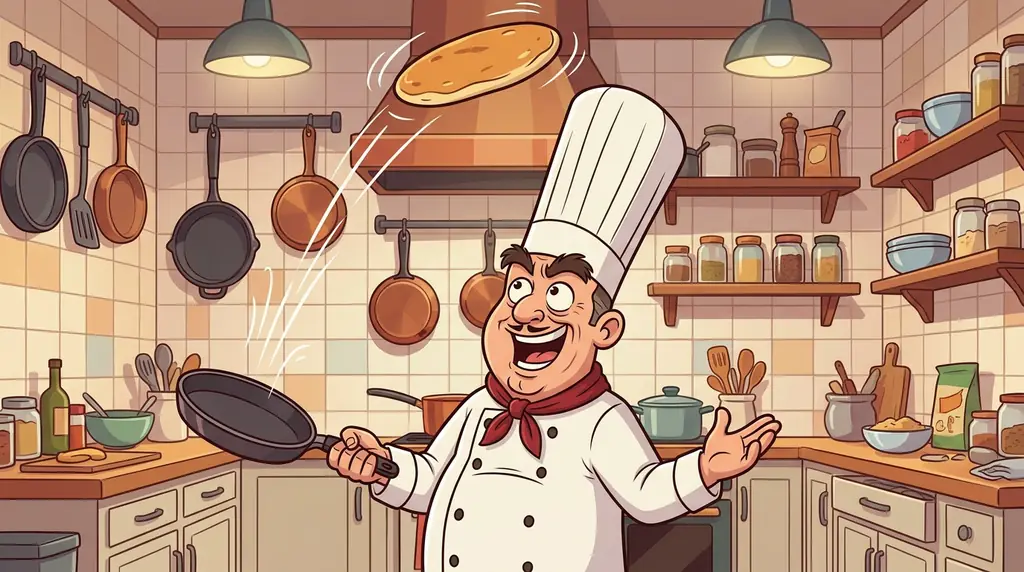 The kitchen
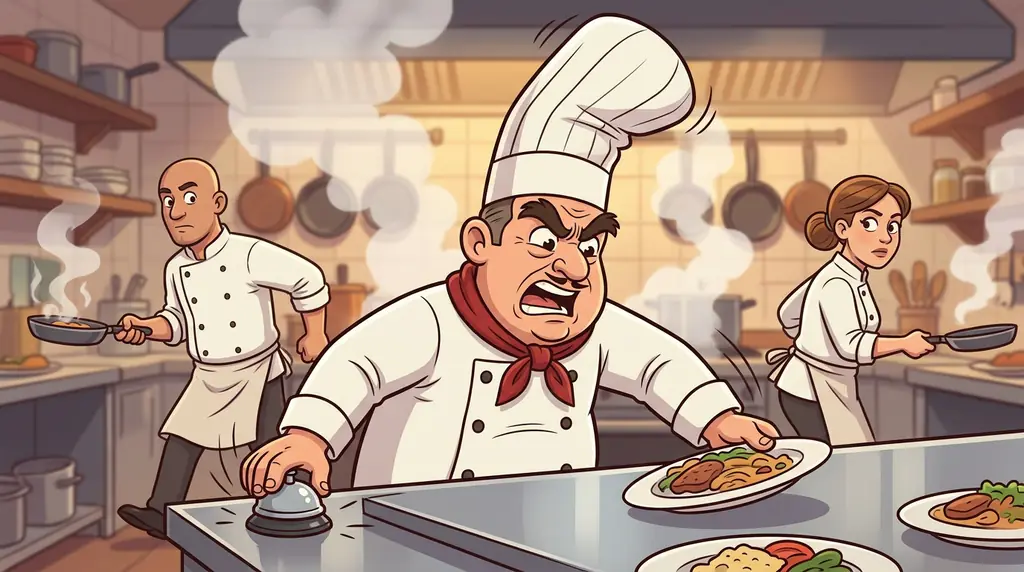 The dinner rush
How to make a caricature
Start from your own photo, or describe an invented person in one line. Pick the one feature to push, such as the eyebrows, the grin or the hair, and the prop that says what you do, such as a stethoscope or a laptop covered in stickers. Pick a style like Wacky or Comic. character.app draws that Character once and keeps the pushed feature the same in every Scene and Look, so the caricature can star in a Story as moving Clips. Your own face, or someone who has said yes; never a public figure.
By the Character App team · Updated · A 5-second Clip on HG H3 Max: about $0.62 (25 Credits) · Web and iPhone
At Starter’s price ($19.99 a month for 800 Credits); our arithmetic.
Looking for the general tool? Start with the AI character creator.
Same Character, new Scenes
Anselm drawn once, then put into 3 more Scenes with the portrait as the reference, so the Character stays recognisable from one Scene to the next. The Studio's Cast works the same way: your Character's own pictures are the reference for every Scene.
01 Portrait
02 The kitchen
03 The dinner rush
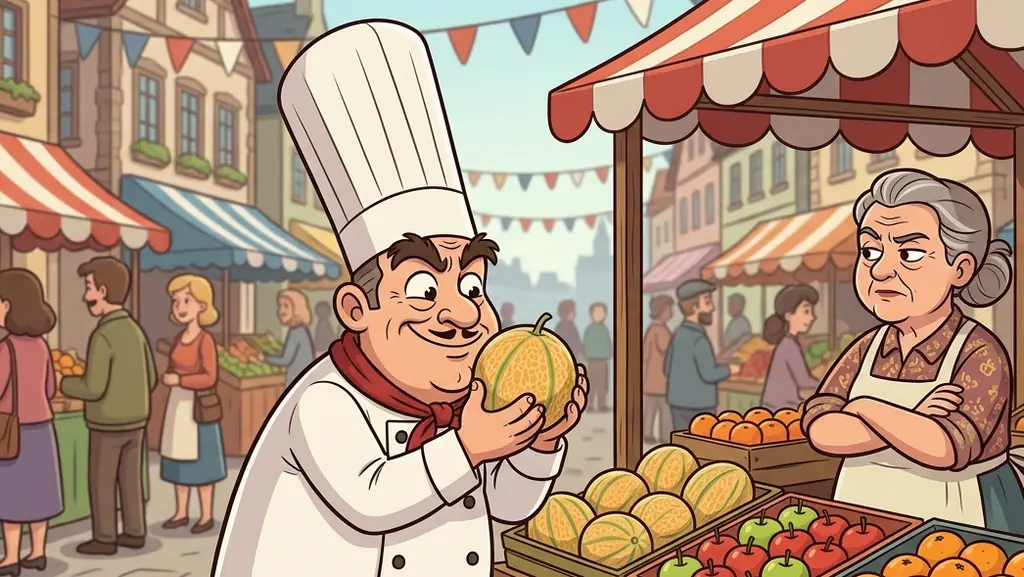
04 Market morning
Example Character drawn for this page with Nano Banana 2.1, each Scene from the portrait as the reference.
A portrait with one decision in it
A caricature is a portrait with one decision in it.
One feature, pushed
The eyebrows, the chin, the hair, the grin. Push one feature hard and leave the rest close to life; push all of them and the likeness is gone.
A prop that says what you do
A stethoscope, a whisk, a guitar, a clipboard. The 'me and my job' caricature lives on one prop.
A pose with an attitude
Arms crossed, mid-laugh, leaning on the desk. The pose is the personality.
Pick the feature, pick the prop, then let it move
Write the caricature down as three choices: the one feature to push ('very tall curly hair'), the prop ('a laptop covered in stickers') and the attitude ('always mid-laugh'). Start from your own photo and add those words, or describe an invented person the same way. The Character keeps the pushed feature in every Scene, so the caricature is not a single picture: give it a first Story, such as the first day at the job the prop belongs to, and it moves in moving Clips with the same exaggeration in every shot. Work caricatures need care: use your own face, or a colleague's only after they say yes.
Me at work, a gift, or someone invented
Pick the occasion.
Me and my job
You, the job prop and a day at work. For a profile, a team page or a farewell card.
The gift
A caricature of a friend who said yes, starring in a short Story about them. For a birthday or a leaving do.
The invented one
A made-up person with one huge feature and a big personality. For a comedy series.
The pushed feature stays pushed
Caricatures drift in a particular way: the pushed feature shrinks back to normal by Scene 3, or a second feature starts to grow. character.app builds each Character once and keeps them on-model across Scenes, Episodes and Looks, Wacky or Comic, so the eyebrows are as big at the end as at the start. Every Scene is filmed as a moving Clip. Caricatures here are of your own face, a person who has said yes, or someone invented; the content policy does not allow public figures or anyone else without their consent.
8 caricature ideas to start from
Ideas to try once your Character is made. Type one in, or your own.
- 01First DayYour caricature starts a new job and the prop it holds causes chaos by lunchtime.
- 02The Leaving DoA caricature of a colleague who said yes stars in a one-minute Story of their best days at work.
- 03Big Hair DayA caricature with enormous hair has to get through a revolving door, a car wash and a wedding.
- 04Kitchen RushAn invented chef with huge eyebrows runs the busiest night of the year in a tiny kitchen.
- 05Office ChampionA caricature of you wins the office talent show with the skill on your CV nobody believed.
- 06Teacher of the YearAn invented teacher with a giant whistle coaches the worst football team in town.
- 07The CommuteYour caricature's commute, told as an epic quest in five Scenes.
- 08Birthday RoastA friend who said yes, drawn as a caricature, relives their most famous mistake on their birthday.
From one line to a Character on film
- 1
Start from you, or from words
Your own photo, or one line for an invented person. Name the feature to push and the prop.
- 2
Pick the style
Wacky, Comic or Cartoon. The Director builds the office, the kitchen or the stage.
- 3
Film the first Story
Direct the Scenes, film the Clips and keep the take where the exaggeration lands.
Questions, answered
Still curious? Using your own photo and the guides go deeper.
Can I make a caricature from my own photo?
Yes. Start from your own photo, pick Wacky or Comic, and name the one feature to push. The Character keeps it in every Scene.
Can I make a caricature of a friend or a colleague?
Only with their yes. The content policy requires the person in the photo or their consent. Ask first, every time.
Can I make a caricature of a celebrity or a politician?
No. Public figures are not allowed, even as a caricature. Make yourself, someone who said yes, or an invented person.
Can I make a caricature of me and my job?
Yes. Name the prop that says what you do, such as a stethoscope or a whisk, and put it in the description.
Is it just one picture?
No. The caricature is a Character, so it can star in a Story, filmed Scene by Scene as moving Clips, with the same exaggeration in every shot.
What does it cost?
Free: your idea as a Story starring your Character, with Scene 1 filmed. A plan films every Scene. Today's prices are on the pricing page, and each Clip's Credits are on its button before you press.
More character types
Every character type
Make your caricature now.
Your own face, someone who said yes, or an invented person. Never a public figure.
Free: your idea as a Story starring your Character, with Scene 1 filmed. A plan films every Scene.