Design a romantic lead worth waiting eight Episodes for
Build the love interest once — the hair over the forehead, the sweater, the smile they try to hide — and film every almost-kiss.
Continue with the free Studio · one World build, one Character a day, 4 Lite Images a day

How to make a romantic lead
Describe your romantic lead in one line — how they look, what they are shy about, why they can't be together — or start from your own photo. Character App builds that Character once and keeps the same face, eyes and sweater in every Scene, Episode and Look, from anime to live-action, and films them as Clips rather than one-off portraits. Add the other lead and the best friend to the Cast, then direct each glance Scene by Scene. Start in the free Studio; a plan unlocks Clips.
Updated September 2026 · Free to start · Web and iPhone
Looking for the general tool? Start with the AI character creator.
Same Character, any Look
Elias in 2 Looks: anime, live action. Put Elias into another World with a different Look and the face, the hair and the wardrobe carry over; only the pen changes.

01 Anime

02 Live action
Original character made for this page with gpt-image-2.5. Looks drawn with gpt-image-2.5 from one portrait.
The character sheet
Before Elias is in a single Scene, there is a sheet: front, three-quarter and back views, plus the expressions the story will need. It is how we design a Character and how Character App keeps Elias consistent from Clip to Clip, in every Look.
It is not a download. You never manage a reference sheet yourself, and the app does not export a turnaround file; the Cast keeps the Character on-model in the Scenes you direct.
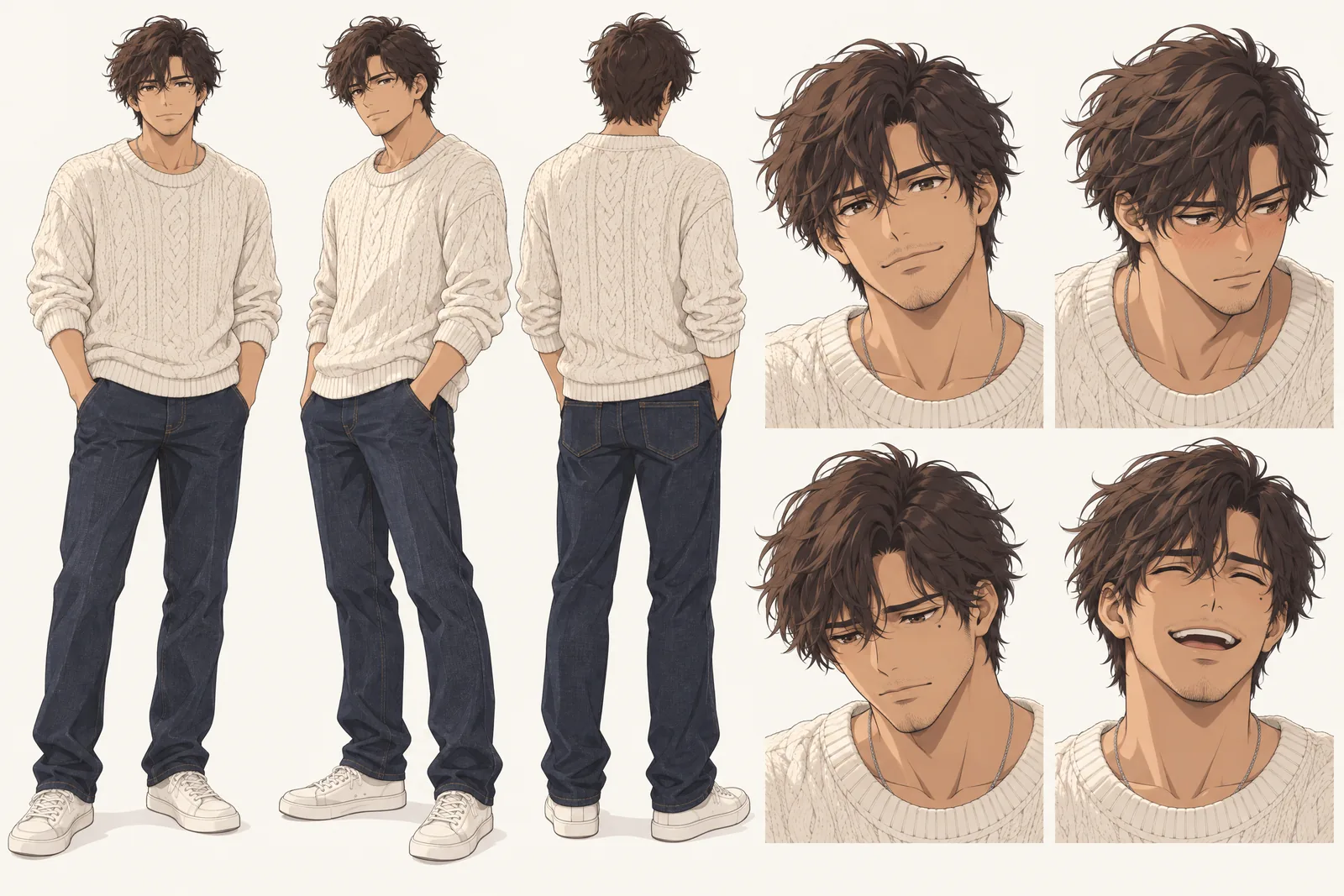
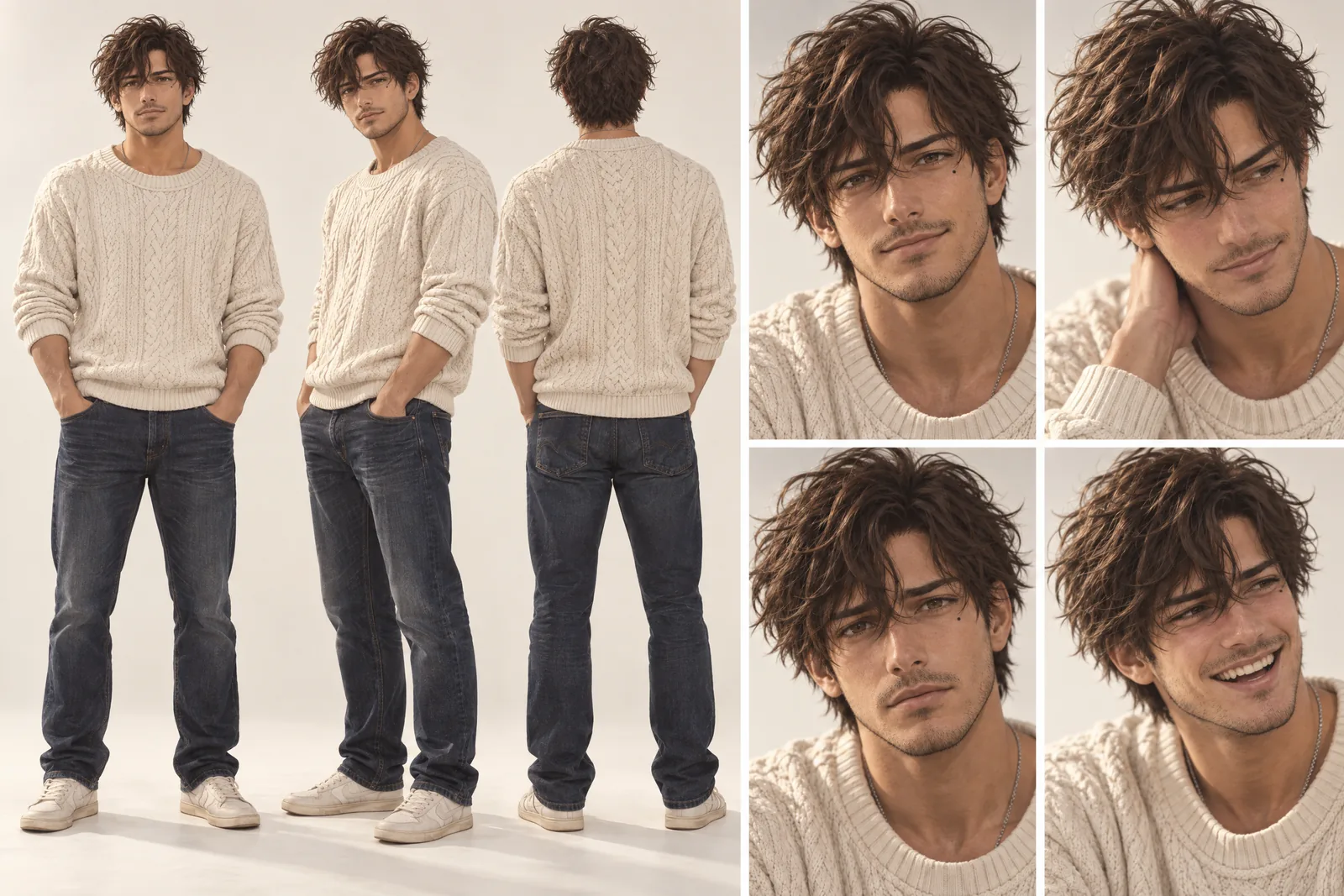
Elias lives in your Characters
Every Character you make keeps its Looks in one place, one for each World’s Look. Use Elias in a new World and the Cast brings the same face into that World’s Look, in every Scene and Clip.
Illustration of the Characters screen, recreated with Elias Varo’s Images. Original character made for this page with gpt-image-2.5.
What makes a romantic lead
A love interest is built from small, repeatable things. The audience falls for details they can spot again next Episode.
One soft detail
A beauty mark under one eye, hair that falls over the forehead, a thin silver chain. Close-ups live on details, and romance is mostly close-ups.
A gesture that becomes theirs
Tilting the umbrella toward you. Setting the mug down before saying something true. Repeat it and it turns into a promise.
A reason they hold back
Shy, engaged to someone else, leaving at the end of summer. The wait is the story.
Pick your kind of lead
Different romances need different leads.
The shy one
Glances away, blushes, says the brave thing on the last line of the Episode.
The rival
Sharp, competitive, secretly keeping score of every compliment. Built for enemies to lovers.
The one who got away
Back in town for the reunion. Flashbacks use the same Character, ten years younger.
The same face, from first glance to finale
Romance runs on recognition. If the love interest's face drifts between Scenes, the look between the leads stops meaning anything. Character App builds each Character once — from a description or your own photo — and keeps them on-model in every Scene, Episode and Look. Draw him in a modern TV anime World at a rainy bus stop, then put the same Character into another World with a live-action Look, on a rooftop with string lights; he is still him. Every Scene is filmed as a Clip, so the hand he holds out actually moves.
Star in it — with permission
Add your own photo in the app to play a lead. Casting your partner opposite you? Only with their permission — the content policy requires the person in the photo or their written consent. Public figures are off the table, every romantic lead is an adult, and the romance stays tasteful: longing and the kiss that cuts to the next Scene.
8 romantic lead ideas to start from
Press one and it lands in the idea box. Change a word or keep it; the Director takes it from there.
- 01The LetterA bookseller finds the letter he wrote at seventeen, tucked inside a used paperback.Use this idea
- 02Bus Stop, TuesdaysTwo strangers stand under one umbrella every rainy Tuesday and never trade names.Use this idea
- 03One More SongThe rooftop party is ending. He asks her to stay for one more song.Use this idea
- 04Rival ChefsTwo chefs run one kitchen for a week and sabotage everything except each other.Use this idea
- 05The Fake DateHe agrees to be her date for one wedding. He forgot it's a three-day wedding.Use this idea
- 06Night TrainTwo strangers, one sleeper cabin, a border crossing that takes all night.Use this idea
- 07The Ex, HiredThe architect she hires for her café is the ex who drew it for her years ago.Use this idea
- 08Lighthouse KeeperA new keeper arrives on the island. The old one doesn't want to leave.Use this idea
From one line to a Character on film
- 1
Pitch the lead
One line: how they look and why they hold back. Character App sketches the World around them — the bookshop, the bus stop, the rooftop.
- 2
Cast the couple
Draw both leads and the friend who knows everything, from descriptions or your own photo. The faces lock from the first Scene.
- 3
Film the slow burn
Direct each Scene, keep the takes where the glance lands and end on the almost. The next Episode picks up the tension.
Questions, answered
Still curious? Using your own photo and the guides go deeper.
Can I design a love interest from scratch?
Yes. Describe the look, the style and the personality and the Studio draws them as a Character you keep, then films them in real Scenes.
Will my romantic lead look the same in every Episode?
Yes. Each Character is built once and kept on-model across Scenes, Episodes, wardrobe changes and Looks — anime, live-action or 3D.
Can I make an anime love interest?
Yes. Choose an anime Look for the whole romance World, or put the same Character into another World with a live-action Look.
Can I put myself and my partner in a romance?
You can star as yourself by adding your own photo in the app. Your partner has to agree first: the content policy requires the person in the photo or their written consent.
How romantic can it get?
Romantic, not explicit. Leads are always adults and sexually explicit content is against the content policy — this is for longing and tension.
What does it cost to design a romantic lead?
Currently the free Studio gives you one World build, one Character a day and 4 Lite Images a day. A plan unlocks Clips and Film — Starter is $19.99 a month for 800 Credits — and a 5-second Clip made from an Image on H3 Max Turbo is 15 Credits. The price is on the button before you press.
More character types
Every character type

Your romantic lead starts with one line.
Continue with the free Studio · one World build, one Character a day, 4 Lite Images a day